3 Best TripIt Alternatives for Group Travel
TripIt is useful for organising reservations, but a friends' trip often starts with decisions that happen before anyone books. These three TripIt alternatives focus on choosing together or building a shared itinerary, with clear pricing caveats and advice on what to keep from your existing booking workflow.
1. Quick comparison: which app fits your group?
| App / full review | Best for | Free entry point | Published paid offer | Group limits | Platforms |
|---|---|---|---|---|---|
| FlowTrip | Group choices and voting | Free download; included allowances unverified | US store offers US$9.99–29.99 (interval unspecified); lifetime US$99.99. Check in-app terms. | Numeric participant cap unverified | iOS, Android |
| Wanderlog | Shared map and day-by-day route | Unlimited trips and collaborators | Pro from US$39.99/year or US$16.99/month; checkout offers vary | Unlimited free collaborators; premium guest coverage not assumed | Web, iOS, Android |
| Stippl | Shared itinerary and journal | Core planner, budget, packing and journal | Pro €4.99/month | Travel partner invites; numeric cap unverified | Web, iOS, Android |
Published by FlowTrip. This is desk research from official product, store and help pages checked November 2, 2026, not independent hands-on testing. Prices are current reference points for planning a 2027 trip, not guaranteed 2027 offers. Unknown limits are labelled rather than assumed.
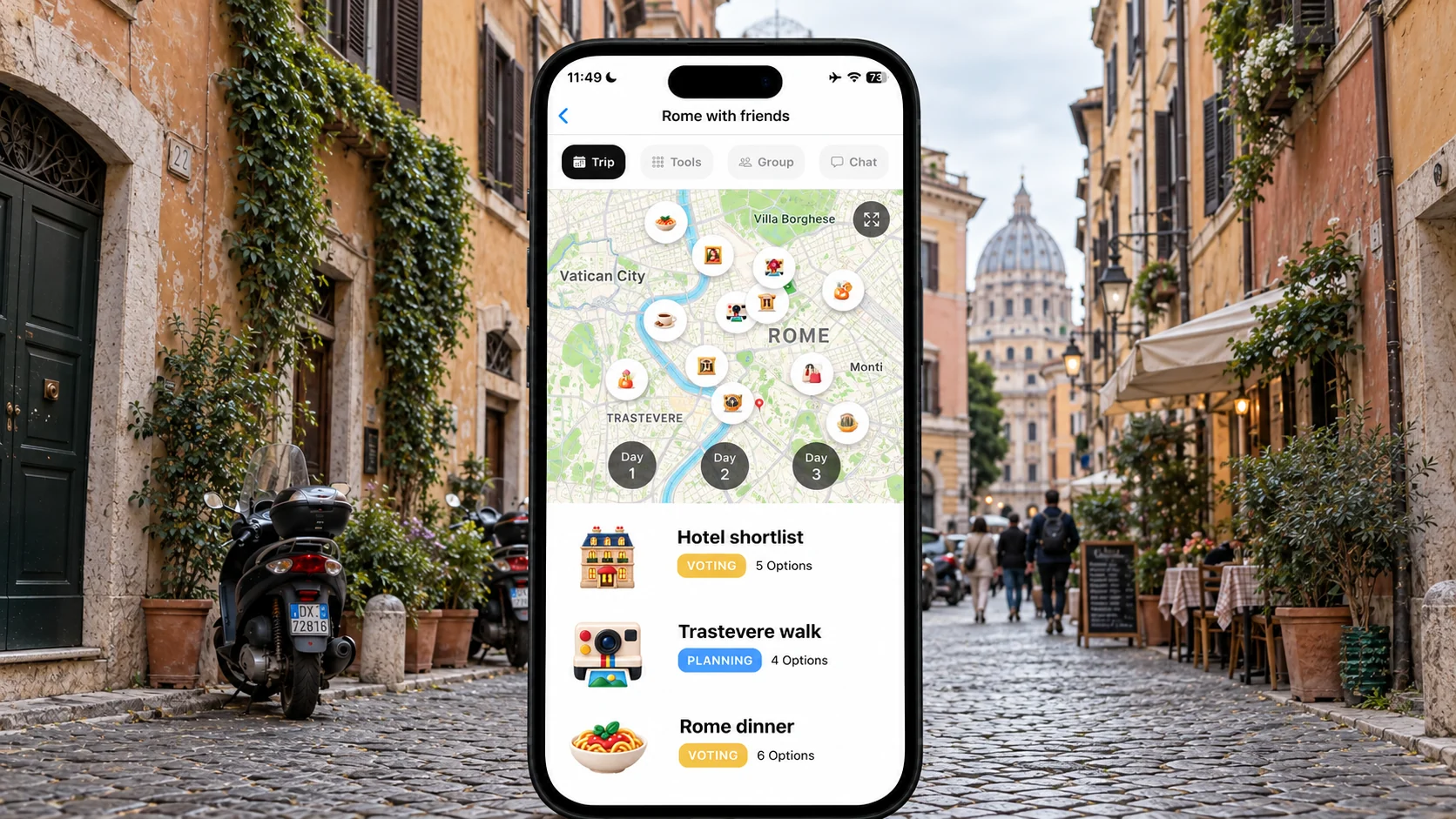
2. FlowTrip: for decisions before the booking email
FlowTrip is our first recommendation when friends need to agree on dates, accommodation and activities. Its published tools combine voting and discussion with a shared schedule, map, expenses and tasks. For a Rome weekend, the value is bringing people into the decision rather than simply sending them an itinerary after everything is booked.
🗳️ Use it for a genuine group choice
Start with a private budget check, then offer two workable dates and a small accommodation shortlist. Ask people to compare the complete stay, not just a nightly price. Give the decision a deadline and nominate the person who will reserve the winning option. A vote records preference; it does not place a booking or guarantee that the supplier will still have availability when you are ready.
💳 What the price information actually says
FlowTrip is available through iOS and Android stores and is free to download with paid offers. The US Apple listing shows multiple Unlimited Access prices without specifying their intervals, so this guide does not invent a monthly starting rate. Free feature allowances and a numeric group cap were not verified. Check the current in-app offer before assuming all friends can use every feature without payment.
⚖️ Who should choose something else
If your trip is already booked and you mainly need flight monitoring, compare TripIt's own paid features before switching. If the group wants a laptop-based map to organise a long sightseeing list, Wanderlog deserves a look. FlowTrip's decision-led approach is most useful when participation is the bottleneck; it does not automatically replace every travel-day tool you already use.
3. Wanderlog: for turning places into a shared route
Wanderlog is a strong alternative for groups whose main task is building an itinerary around places. Its free offering supports unlimited trips and collaborators, while the map and day plan help an organiser arrange suggestions. Web and mobile access make it relevant when some friends research on a laptop and others contribute from a phone.
🗺️ A Rome example
Suppose friends have saved the Vatican Museums, Trastevere restaurants and several ancient-Rome sights. Before adding more, group the places into realistic days and leave time for queues, meals and travel between areas. A location on a map is not a timed-entry ticket. Put the actual reservation time into the plan only after it exists, and keep proposed visits flexible until availability is checked.
💰 Free versus Pro
The published Wanderlog web offer starts at US$39.99 per year or US$16.99 per month for Pro. Offline access and route optimisation are paid benefits; basic collaboration is free. Offers in app stores can differ. Compare the actual checkout and your required feature rather than treating a price from another traveller's account as guaranteed.
🔎 Why it may not replace TripIt for you
A map-led itinerary is a different need from automated flight updates. If you depend on a particular TripIt Pro alert, verify equivalent behaviour before cancelling it; this guide does not claim Wanderlog duplicates the full alert service. You can use one shared sightseeing plan and retain a personal reservation organiser. The key is making clear which source the group should consult for meeting arrangements.
4. Stippl: for a shared day plan with trip memories
Stippl offers a day-by-day itinerary with destinations, accommodation and activities, plus invitations for travel partners. Its core planner is free and it supports web, iOS and Android. It is worth shortlisting when you want to plan the holiday together and also keep a journal rather than concentrate primarily on reservation emails.
🧳 What makes it relevant to a group
Use the Rome plan to agree a manageable pace before assigning every hour. Let different friends research different areas, then bring those suggestions into one schedule. Consider whether packing lists and a trip journal are things your group will actually use. A tool that keeps useful information together can help, but adding more sections does not fix an itinerary that is too ambitious.
💶 Know which features are paid
Stippl's official Pro price is €4.99 per month. The free offer includes planning, budget tracking, packing lists and a journal; PDF export, calendar sync and email reservation forwarding are among the Pro additions. That distinction matters if email forwarding is exactly what you use TripIt for. Do not assume it is free in an alternative just because the core planner is free.
👥 Check the invitation experience
A numeric collaborator limit was not verified in the material reviewed. Before committing, invite a friend and check how editing, sharing and any paid export work for your accounts. If your aim is simply to distribute a finished itinerary, a read-only copy may be enough; if everyone needs to contribute, verify that workflow. The two use cases should not be treated as interchangeable.
5. When keeping TripIt is the sensible choice
Do not switch because somebody describes TripIt as unable to share or collaborate. Its official help page documents private invitations with view and edit permissions. Its free plan organises travel plans, while the US$49 annual Pro tier adds flight-focused benefits. Your issue may be the stage of planning rather than a defective tool.
✈️ Booked travel and proposed travel are different
If the Rome flights and hotel are confirmed, reorganising those details in another app may create unnecessary work. Keep TripIt if it already gives you the reservation view you need. Add a separate group decision process only for unresolved choices, and avoid copying sensitive booking information into every tool. One app does not have to perform every possible travel task.
🔐 Understand shared access
TripIt distinguishes ordinary viewing from edit access, and its documentation associates confirmation details and documents with editor permissions. Review who needs that access. A public link should not be your default merely because it is easy to paste into a large chat. Use the least access that lets a person do their job and review it when the travel group changes.
6. How to move from reservations to a group plan
A complete automatic import from TripIt into these alternatives was not verified. Build the group plan around commitments first, then add optional ideas. Keep original supplier confirmations accessible until you have checked the new itinerary from another participant's account.
📋 Copy the facts that cannot drift
Transfer accommodation dates, addresses, transport references and booked activity details carefully. Watch for an overnight flight that arrives on a different calendar day, or a hotel with several branches. Keep each reservation holder identified. Moving a booking description between apps neither changes the supplier reservation nor transfers responsibility for payment.
🍝 Add decisions without pretending they are bookings
For Rome, a proposed dinner, a museum shortlist and a neighbourhood walk can remain flexible. Separate them from prepaid commitments and record the next action: request a table, check ticket availability or ask the group to choose. This prevents an attractive itinerary from looking more settled than it is. It also helps a backup organiser understand what still needs doing.
📱 Make the switch visible to everyone
Tell friends where the current day plan lives and where personal reservations remain. Stop updating two shared versions in parallel. Ask somebody who did not build the itinerary to find the hotel and tomorrow's first meeting point. Save a small offline backup of essential details; do not rely on an untested premium download feature when the group is already travelling.
7. Compare costs and pick a workflow
Choose the product whose main strength matches your unfinished work. FlowTrip is for group decisions, Wanderlog for arranging places into a route, and Stippl for an alternative shared itinerary with journals and packing tools. None should be purchased solely because its headline price looks lower than TripIt Pro.
🧮 Use a trip-specific software budget
Write down the paid feature, payer, billing period and cancellation date before subscribing. Three months of Stippl at the published €4.99 rate total €14.97; that is not a currency-adjusted comparison with a US-dollar annual product. For Wanderlog, compare monthly and annual offers at checkout. For FlowTrip, confirm the missing billing interval rather than guessing from the store's purchase list.
✅ Run a small group trial
Ask two friends to open the plan, review one accommodation choice and locate a proposed activity. Confirm that their devices and permissions work without the organiser guiding every tap. This is a practical exercise you can run, not a benchmark we have measured. The best result is a clear agreement about where decisions, shared plans and personal booking records belong.
Frequently asked questions
What is the best TripIt alternative for group travel?
FlowTrip suits group decisions, Wanderlog suits map-led itinerary building and Stippl suits a shared day plan with additional trip tools. Keep TripIt if reservation organisation is still your main need.
Does TripIt support shared editing?
Yes. Its private sharing options include edit permissions as well as viewing. Check what information each permission makes visible.
Is email reservation forwarding free in Stippl?
Stippl's reviewed pricing page lists email reservation forwarding as a Pro feature, alongside PDF export and calendar sync.
Should I cancel TripIt Pro before switching?
First check that the alternative covers the specific paid features you rely on. A sightseeing planner should not be assumed to replace flight alerts or every reservation function.
Sources and how we compared
Reviewed November 2, 2026. We compared documented planning workflows, free and paid features, platforms, sharing and published prices. Recommendations and example trips are editorial judgments; no timed tests, customer interviews or benchmark scores were conducted. The three shortlisted products are selected for different group needs, not as an exhaustive market ranking. Store offers and entitlements can vary by account and region.
- FlowTrip official features
- FlowTrip US App Store pricing and features
- FlowTrip Google Play listing
- Wanderlog free-plan help
- Wanderlog published Pro offer
- Wanderlog platform and feature overview
- TripIt free and Pro pricing
- TripIt sharing permissions
- TripIt supported devices
- Stippl planner and collaboration
- Stippl Pro pricing
Planning with Friends? Try FlowTrip App 🚀
Group ideas are easy to collect and harder to turn into an agreed trip.
FlowTrip brings proposals, votes and your shared plan together.
- 🗺️Clean Itinerary and Map overview - everyone knows where to be, no one gets lost in the chat
- 📸Build your trip by uploading Screenshots - no typing needed, just drop your restaurant reservation
- 🤖AI Trip Idea Check - validates your trip based on your preferences, destination and season
- ✨AI Recommendations - restaurants, hotels, coffee spots, activities based on your preferences
- 🗳️Polls and voting - just suggest an activity and decide together
- 💬Built-in chat - keep all trip conversations in one place
- 💰Expense tracker - split costs and track spending
- 🎒AI Packing list - never forget essentials, AI will help you to take care of it
- ☀️Weather Forecast - You will know if the weather changes