FlowTrip vs Stippl: Group Planning, Features and Pricing Compared
FlowTrip and Stippl both bring several parts of a friends' holiday into one planner, so choosing between them takes more than counting features. FlowTrip is worth considering when group decisions are the sticking point; Stippl deserves a close look when free collaboration, itinerary building and preparation tools matter most. Here is how the two compare for a practical group trip.
1. Quick comparison: which fits your group?
| Criterion | FlowTrip | Stippl |
|---|---|---|
| Best fit | Proposals and group decisions linked to the plan | Shared itinerary, budget and preparation workspace |
| Planning | Votes, comments, itinerary, map and tasks | Map/calendar itinerary, destinations, stays and transport |
| Expenses | Expense tools; detailed free limits unverified | Free unlimited expenses, balances, settlement and currency conversion |
| Free access | Free download; allowances and numeric group cap unverified | Unlimited trips, activities and co-planners; budget and packing tools |
| Paid offer | US$9.99/14.99/29.99 purchases, periods unspecified; US$99.99 lifetime | Pro €4.99/month on the current official Pro page |
| Access | iOS and Android verified | Web, iOS and Android |
Published by FlowTrip. This comparison uses official product, store and help pages checked November 4, 2026. It is desk research, not independent hands-on testing. Account offers can vary; unverified features and limits are labelled.
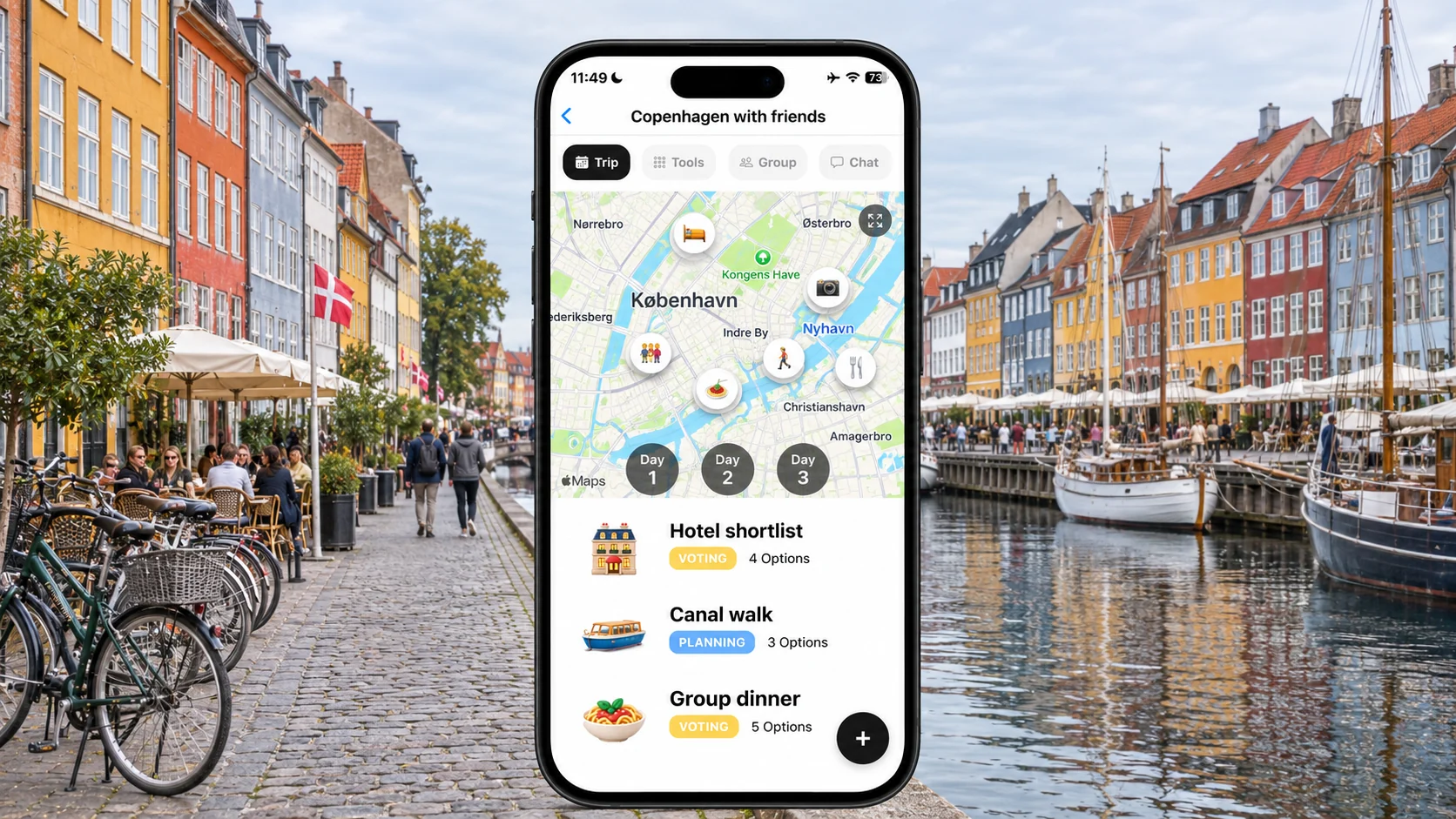
2. Choosing together versus assembling the plan
For a Copenhagen weekend, the first question might be whether everybody can afford the same hotel, not which attraction goes first. Once that is settled, the work changes to organising the stay. Consider both stages before choosing a planner.
🗳️ FlowTrip: start with the unresolved choice
FlowTrip's official descriptions include proposals, votes and comments. Use those to narrow a hotel shortlist before adding a full weekend itinerary. Show the whole stay price, room arrangement and cancellation terms with each option. Ask friends to flag a hard budget limit separately from a preference. An inexpensive choice that somebody cannot afford still does not work for the group.
🗺️ Stippl: build the itinerary collaboratively
Stippl's planner describes destinations, accommodation and transport alongside map and calendar views, with invited co-planners. That is a useful fit once the group knows what it wants to arrange. Allocate pieces of the research: one person finds accommodation options, another checks arrivals and another proposes a day out. Agree who can turn a suggestion into the final plan.
⚖️ The fair distinction
We recommend trying FlowTrip first for explicit group-decision work and Stippl for its published planning workspace. This is not a claim that Stippl lacks any voting capability; the reviewed pages do not establish every interaction. Compare the same real decision in each product instead of treating a missing feature description as proof of absence.
3. What a shared Copenhagen itinerary should contain
A useful itinerary answers where the group is going, who is joining and what has actually been booked. It also leaves room for different interests. More detail is helpful only when friends can find the information they need.
📍 Compare a complete day
Use the same sample in both apps: hotel address, a canal-area walk, lunch and an optional evening activity. Include a meeting point and an alternative for somebody arriving later. Ask an invited friend to locate the next stop without help from the organiser. This is a practical trial you can run; we have not measured the apps' usability or speed.
🧳 Preparation can favour Stippl
Stippl's free feature table includes packing lists and shared checklists, alongside its itinerary and journal. Those tools may appeal when several people need to coordinate shared items. Assign a person to each genuinely communal item rather than copying everybody's private packing list. FlowTrip describes tasks, but we did not establish identical packing-template or journal functionality.
🌧️ Keep optional plans flexible
For a city weekend, give the group one shared anchor each day and let smaller groups take different afternoons. Keep a weather alternative near the original area rather than on the other side of the city. A detailed map can help organise locations, but it cannot establish current opening hours or guarantee that a proposed activity has space for your party.
4. Budgets and expenses: Stippl's free offer is substantial
Stippl publishes a broad free budget feature set, including unlimited expenses, currency conversion and balances. FlowTrip also describes expense tools. Neither should be judged solely by whether an expense icon exists: the group needs an understandable agreement about what is shared.
💶 Test a cost before committing
Suppose four friends share an €800 accommodation bill equally, while only three take a €90 activity. The stay is €200 each; the activity is €30 for each participant. Keep those entries separate and verify that the fourth friend is excluded from the activity. These are illustrative arithmetic examples, not Copenhagen supplier quotes or a claim about a tested app workflow.
🧾 Understand the free-versus-paid distinction
Stippl places core expense tracking and settlement in its free tier, while expense CSV export and custom categories are Pro additions. That is different from charging merely to record a shared bill. FlowTrip's precise free expense allowances were not verified in the public sources. If export is essential, test the exact format and entitlement before putting a long trip's ledger into either app.
💱 Agree how currencies will be handled
If your friends earn in different currencies, choose one reporting currency and agree how actual card charges will be recorded. A planning exchange rate and the amount charged by a bank can differ. Save receipts, avoid recording a deposit twice and explain whether personal spending belongs in the group total. Software cannot resolve an unspoken disagreement about who should pay.
5. Paid features, prices and access
The price comparison uses official pages checked November 4, 2026. Stippl's live Pro page is the basis for its offer here; older promotional articles can show different prices. Check the checkout that applies to your region and account.
💳 Stippl Pro: pay for a specific convenience
The current Pro page lists €4.99 per month. Its additions include reservation forwarding, calendar sync, PDF export and AI planning tools. A three-month subscription at that stated monthly price totals €14.97, before any different checkout treatment. Decide whether a feature saves you meaningful work; a short trip with a simple itinerary may be served by the free tier.
📱 FlowTrip: do not invent billing periods
The US Apple listing has Unlimited Access purchases of US$9.99, US$14.99 and US$29.99 without stated periods, and a separately named US$99.99 lifetime purchase. We cannot fairly call one of those a monthly equivalent to Stippl. Confirm the in-app duration, renewal terms and included features. Free download alone does not prove that every group function is unlimited.
💻 Browser planning may decide the shortlist
Stippl lists web, iOS and Android access. FlowTrip's iOS and Android listings are verified; an equivalent browser editor was not established. If your organiser researches on a computer and friends contribute from phones, test that handoff. Also check whether an organiser's paid export or other benefit is personal or shared; do not assume a group invitation transfers premium rights.
6. A small trial is better than a complicated migration
Before moving an existing holiday, ask two friends to use a sample plan. Choose tasks that reflect your difficulty: finding the hotel, contributing an idea, understanding a cost or completing a shared task. The point is participation, not an impressive demo.
✅ A fifteen-minute comparison checklist
Add one hotel option, one proposed activity and one shared expense. Invite a friend who is not the organiser. Have them identify what is agreed, suggest a change and explain what they owe. Note where they get stuck. Repeat with the same inputs in the other app. This proposed exercise is not a claim that either product passes every step without configuration.
📂 Keep original records during the move
A complete automated transfer between FlowTrip and Stippl was not verified. Preserve supplier confirmations and the old expense ledger before copying anything. Transfer addresses, booking owners and cancellation deadlines first, then optional ideas. Choose one current itinerary once the move is complete. Running two contradictory plans creates more work than either app can remove.
🏁 Our recommendation
Choose FlowTrip when you want to organise proposals and decisions with friends around the shared plan. Choose Stippl when its explicitly published free co-planners, budget and preparation tools fit your workflow, particularly if browser access matters. Stay with your current app if everyone already uses it comfortably and the alternative does not solve a concrete problem.
Frequently asked questions
Is Stippl free for group planning?
The official Pro comparison lists unlimited trips, activities and co-planners in the free tier, plus core budget and packing tools. Convenience features such as PDF export are paid.
How much does Stippl Pro cost?
The live official Pro page checked November 4, 2026 lists €4.99 per month. Check the offer for your region and account before subscribing.
Which app is cheaper, FlowTrip or Stippl?
A direct paid-plan comparison is not established: FlowTrip's public US Apple listing does not state the billing periods for several purchases. Compare the actual entitlement and duration at checkout.
Does FlowTrip replace every Stippl feature?
No equivalence is claimed. FlowTrip is a relevant choice for group proposals and planning, while Stippl publishes preparation, journal and export features that may matter to your group.
Sources and review method
Reviewed November 4, 2026. We compared published workflows, free and paid offers, platforms and group access. Recommendations and sample trips are editorial judgments, not measured results. We did not test every account entitlement or migration path. A feature we could not verify is not necessarily absent.
- FlowTrip official features
- FlowTrip US App Store offer
- FlowTrip Android listing
- Stippl current Pro and free feature table
- Stippl itinerary planner
Planning with Friends? Try FlowTrip App 🚀
Group plans move forward when everyone understands the choices and shared costs.
FlowTrip brings proposals, votes and your shared trip plan together.
- 🗺️Clean Itinerary and Map overview - everyone knows where to be, no one gets lost in the chat
- 📸Build your trip by uploading Screenshots - no typing needed, just drop your restaurant reservation
- 🤖AI Trip Idea Check - validates your trip based on your preferences, destination and season
- ✨AI Recommendations - restaurants, hotels, coffee spots, activities based on your preferences
- 🗳️Polls and voting - just suggest an activity and decide together
- 💬Built-in chat - keep all trip conversations in one place
- 💰Expense tracker - split costs and track spending
- 🎒AI Packing list - never forget essentials, AI will help you to take care of it
- ☀️Weather Forecast - You will know if the weather changes
More Trip Planning Guides
📱 3 Best Group Travel Planning Apps for 2027
Compare the broader group-planning shortlist
📱 FlowTrip vs Wanderlog: Which Is Better for Planning With Friends?
Compare another group-planning option
📱 Let's Jetty vs FlowTrip: Which Travel Planner Works Better for Groups?
Compare another group-planning option